1. Go to
BMW VIN Decoder and enter the VIN to see if Adaptive M Suspension option has been added to your
BMW.
2. Physically check and see if wires are attached to your dampers.
3. Check the iDrive settings below:
Press the menu button on iDrive controller and select 'Settings'.
Select 'Driving Mode'
Select 'Configure SPORT'
If your BMW is equipped with Adaptive M Suspension, 'Chassis' and 'Drivetrain & Chassis' will be displayed. If not, 'Drivetrain' is the only option. In this menu, you can change what the Sport option does to the vehicle.
To engage Sport or Sport Plus mode, click the rocker upwards.
Sport Plus mode will show up on the dash and iDrive screen. BMWs equipped with Adaptive M Suspension will have the Drivetrain & Chassis highlighted in red.
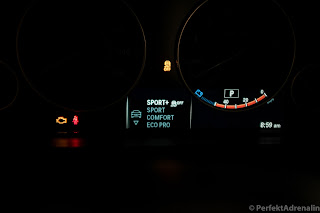 |
| Sport+ mode turns off traction control. |
The pictures above are taken from a 2015 BMW F32 428i M Sport, your iDrive and dash display may vary.
In order to access the Sport+ mode, your BMW needs one or more of these options:
- Adaptive M Suspension (2VL)
- Sport Automatic Transmission (2TB)
- Sport Line Option
- Variable Sport Steering (2VL)
What is the difference between Sport and Sport+ mode?
- Traction control is turned off and allows for larger slip angles.
What is Adaptive M Suspension?
- Electric adjustable dampers that can be controlled by the driver. The drive can choose whatever setting is appealing with Comfort, Sport, and Sport+ modes.
Note: Selecting chassis and drivetrain is possible on some options without having adaptive suspension.


 . The Mahle filter has more pleats for better filtration and performance. Look at the picture below to see the difference.